
Seven red lines, all strictly perpendicular, some in green ink? We have a whiteboard for that, built with Rust and WebGPU.
Linux, Windows, macOS, browser, mobile. Real-time collaboration. No account. One binary.
Script it, hand it to an AI agent, or embed just the canvas in your own web app with drafftink-canvas, and build something we didn't think of.
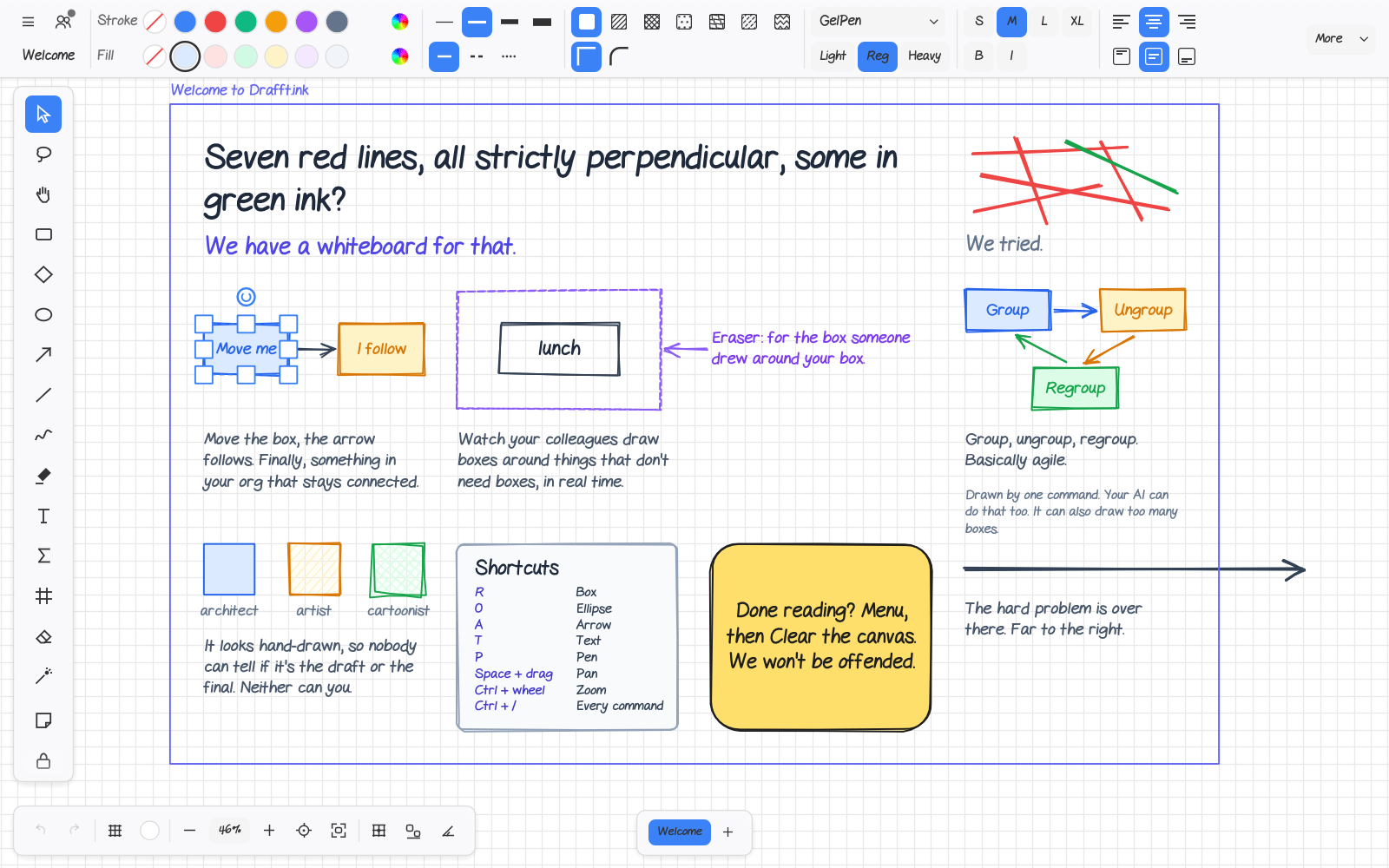
It runs in the browser, on Linux, Windows and macOS, on tablets and on phones.
- Infinite canvas. Room for every idea, and plenty of space to push the hard problem far to the right.
- Arrows that stay attached. Move the box, the arrow follows. Finally, something in your org that stays connected.
- Draw together. Watch your colleagues draw boxes around things that don't need boxes, in real time. Edits merge even after someone was offline.
- Sketch style. It looks hand-drawn, so nobody can tell if it's the draft or the final. Neither can you.
- Groups and frames. Group, ungroup, regroup. Basically agile.
- Smart guides. Shapes snap into line and to equal gaps while you drag.
- Laser pointer. For pointing at the box everyone is already looking at.
- Eraser. For the box someone drew around your box.
-
Text and math. Hand-drawn and clean fonts, colours per letter, and LaTeX like
$e^{i\pi} + 1 = 0$ inside your text. - Images and library. Drop in pictures. Keep the shapes you draw again and again, and import Excalidraw libraries.
- Open files. Plain JSON, Excalidraw files in and out, Mermaid in, PNG and SVG out. A PNG export carries the drawing inside. "Can you send me the source file?" You already did.
- Fingers and pens. Draw unnecessary boxes with your finger, from the sofa. Works on iPad, tablets and phones. Two fingers pan and zoom, and a resting palm does not draw.
- Light and dark. Dark mode changes the canvas too, and the colour buttons show what you will actually get.
- Fast. Handles 100,000 shapes. Your diagram has 12, but it's nice to know.
- No tracking. We don't know what you draw, and frankly, we don't want to.
Everything you can click is a named command, like element.create, diagram.create or arrange.align. The buttons, shortcuts, menus, the command palette (Ctrl+/), scripts, AI agents and the tests all use the same commands. When a command can't run, it says why in plain words, so a script or an agent knows what to fix instead of guessing.
That makes Drafft.ink easy to drive from code and from AI agents. Your AI can draw here too. It can also draw too many boxes.
Give your AI agent a whiteboard (MCP).
claude mcp add drafftink -- drafftink mcp                   # the desktop app you have open
claude mcp add drafftink -- drafftink-headless mcp          # no app needed: its own document
claude mcp add drafftink -- drafftink mcp --relay           # the browser tab you have open
An agent can build a whole flowchart with one diagram.create call, read the drawing back as an outline, and move, style or export anything. Everything listens only on your own machine and needs a fresh token each launch. See docs/agents.md.
Or script it from the command line. No window needed.
cargo install drafftink-headless
drafftink-headless convert diagram.mmd diagram.drafftink                  # Mermaid in, drawing out
drafftink-headless run script.jsonl --doc in.drafftink --out out.svg      # one command per line
drafftink-headless commands --family diagram                               # what is there
Two programs, split by whether they have a screen. drafftink is the desktop app; its one subcommand, drafftink mcp, is the bridge to the window that is open. drafftink-headless has no GPU, window or file-dialog code, so it runs over SSH, in CI and in a container: the tools above, an MCP server that needs no app (drafftink-headless mcp) and the collaboration server (drafftink-headless serve). Typing a headless tool after drafftink prints where it went. A file named like a subcommand is opened as drafftink ./mcp or drafftink -- mcp. See docs/cli.md.
For apps of your own, the canvas is also a library: panning, zooming, hit testing and dragging, like Konva, but on the GPU. The editor (arrows, groups, frames, undo, collaboration) sits on top of it.
In the browser. Go to drafft.ink. That was it.
On your computer. You need Rust.
cargo install drafftink # from crates.io; the hand-drawn fonts are drawn with Noto Sans instead, see Licence belowOr build it from the repository, which has the hand-drawn fonts:
git clone https://github.com/noahmchugh/drafft-ink.git && cd drafft-ink
cargo run --release -p drafftink --features hand-fonts     # or scripts/run-native.sh
Your own web version.
scripts/build-web.sh          # builds into dist/
scripts/serve-web.sh 8080     # then open http://127.0.0.1:8080
Self-host the collaboration server.
cargo install drafftink-headless --features sqlite,s3      # or: cargo run --release -p drafftink-headless -- serve --web-dir dist
drafftink-headless serve --web-dir dist
One binary, no config file. Nowhere to put a typo. Rooms are stored on disk, or in SQLite or S3 if you ask (the features above add those two). The release page has the binary with the web build in one folder. See docs/server.md.
Issues and pull requests are welcome. Read AGENTS.md first and run cargo xtask ci before you send a change.
AGPL-3.0. Use it, change it, host it, keep it open. If you host a changed copy, share your changes too. The app links to its source in the About dialog. The bundled fonts have their own terms, listed in ATTRIBUTION.md.
The hand-drawn fonts (GelPen, GelPen Serif, Vanilla Extract). These fonts are not covered by the AGPL. They are by Shara Weber and remain under her terms. They are included only so Drafft.ink can display them. For any other use, get them from sharasfonts.com and follow her terms. They are not part of the crates.io packages. cargo install drafftink therefore draws those three families with Noto Sans; a build from this repository with the Cargo feature hand-fonts (the web app and the release binaries have it) draws them as designed. See docs/publishing.md.