This API is in beta testing and may be to subject to the occasional tweak. Any such tweaks will be documented here.
Portals provides a user authentication and management system on top of the One Platform. The Portals API provides access to Portals functionality using a REST-style HTTP API, using the JSON format in request and response bodies, and basic authentication where a Portals account is required.
- Register new user account
- Reset user account password
- Create user
- Get all users
- Get user
- Update user
- Get user token
- Get user portals
- Get user account by email
- Delete user
- Get all user accounts
- List portals of authenticated user
- Get portal
- Create portal
- Update portal
- Delete portal
- Delete portal by rid
- Create new device under a portal of authenticated user
- Create device
- Get device
- Update device
- Delete device
- Create portal data source
- Get data source
- Get data source data
- Append to data source data
- Get data source JSON data
- Append to data source JSON data
The API uses a REST-style API, which means that:
- HTTP verbs in the request indicate the type of action the client wants to take (e.g. GET, POST)
- HTTP status in the response indicate (e.g. 200 for success, 400 for bad request or 401 for authentication error)
Request and response bodies, when present, are formatted using JSON. For more see http://json.org
Note that the JSON examples below are sometimes formatted with extra whitespace for clarity.
The header MUST include:
Content-type: application/json; charset=utf-8
Some API endpoints require a Portals email and password also username and password to combination for authentication. These are passed using basic access authentication. See this link for details about this method of authentication:
http://en.wikipedia.org/wiki/Basic_access_authentication
For some API endpoints, the domain of the request URL indicates information about which domain should be affected. For example, a GET request to:
https://mydomain.exosite.com/api/portals/v1/portal/
...will return a different array of portals than a GET request to:
https://portals.exosite.com/api/portals/v1/portal/
Also, the domain is used for user authentication. Endpoints that are affected by the querying domain are indicated below.
The following types are common to several API endpoints.
A data source object describes a Portals time series data source.
{
    "data": [
        [
            <unix-timestamp-1>,
            <value-1>
        ],
        [
            <unix-timestamp-2>,
            <value-2>
        ],
        ...
    ],
    "info": {
        "basic": <basic>,
        "description": <description>,
        "shares": <shares>,
        "storage": <storage>,
        "subscribers": <subscribers>,
        "tags": <tags>
    },
    "rid": <rid>,
    "unit": <unit>
}
-
"data"is an array of data points. A data point has a unit timestamp and a value.-
<unix-timestamp-N>is a Unix timestamp, measured in number of seconds since the epoch. -
<value-N>may be a string, int, or float depending on the data source type.
-
-
"info"is a dataport object documented in the remote procedure call documentation. But only basic, description, shares, storage, subscribers and tags are exposed. -
"rid"is the RID of a data source. -
"unit"is the unit of a data source.
A device object describes a device in Portals.
{
    "dataSources": [
        <data-source-id-1>,
        <data-source-id-2>,
        ...
    ],
    "info": {
        "aliases": <aliases>,
        "basic": <basic>,
        "description": <description>,
        "key": <key>,
        "shares": <shares>,
        "subscribers": <subscribers>,
        "tagged": <tagged>,
        "tags": <tags>,
    },
    "members": [
        <permission-1>,
        <permission-2>,
        ...
    ],
    "model": <model-id>,
    "rid": <rid>,
    "sn": <sn>,
    "type": <device-type>,
    "vendor": <vendor-id>
}
-
"dataSources"is an array of data source IDs a device has.<data-source-id-N>is a 40 character hex string representing the data source's RID in the One Platform
-
"info"is an client object documented in the remote procedure call documentation. But only aliases, basic, description, key, shares, subscribers, tagged and tags are exposed.<key>is a 40 character hex string representing the client's CIK in the One Platform or null if the authorized user doesn't have ___admin permission to this device.
-
"members"is an array of permission objects listing the members of the device. -
"model"is a string identifying the model -
"rid"is the RID of a device. -
"sn"is a string representing the serial number of the device -
"type"is a constant string representing the device type. Possible values are:"vendor"
-
"vendor-id"is a string identifying the vendor
A group object describes a Portals permissions group.
{
    "id": <group-id>,
    "members": [
        <permission-1>,
        ...
    ],
    "meta": <meta>,
    "name": <short-text>,
    "permissions": [
        <permission-1>,
        ...
    ],
    "userId": <user-id>
}
"id"is a number identifying the group."members"is an array of permission objects listing the members of the group."meta"may be any type. It contains application-specific information describing the group. It MUST be less then 2 megabytes long when it's seralized to a JSON string."name"is the group name. It is a string of fewer than 256 characters. It MUST be unique among the same user in a domain."permissions"is an array of permission objects describing Portals resources members of the group may access."userId"is a number identifying the owner of the group.
A permission object describes a level of access to a particular Portals resource identified by "oid", and is filtered by current domain of its resource, which means a permission list never contains resources which not belong to current domain.
{
    "access": <access>,
    "oid": {
        "id": <id>,
        "type": <type>
    }
}
-
"access"is a constant string. Possible values are:-
"___admin" -
"d_____fs"
-
-
"oid"is an object identifying the resource with the permission.-
<id>is a number identifying the resource. -
<type>is a string identifying the thing to which the permission provides access. It may have one of the following values:-
"DataSource" -
"Device" -
"Domain" -
"Group" -
"Portal" -
"User"
-
-
An object containing information about a portal.
{
    "devices": [
        <device-id-1>,
        <device-id-2>,
        ...
    ],
    "id": <id>,
    "info": {
        "aliases": <aliases>,
        "basic": <basic>,
        "description": <description>,
        "key": <key>,
        "shares": <shares>,
        "subscribers": <subscribers>,
        "tagged": <tagged>,
        "tags": <tags>,
    },
    "planId": <plan-id>,
}
-
"devices"is an array of identifiers for devices of which the portal owns.<device-id-N>is a 40 character hex string representing the device's RID in the One Platform
-
"id"is a numeric identifier for the portal. -
"info"is an client object documented in the remote procedure call documentation. But only aliases, basic, description, key, shares, subscribers, tagged and tags are exposed.<key>is a 40 character hex string representing the client's CIK in the One Platform or null if the authorized user doesn't have ___admin permission to this portal.
-
"planId"is a numeric identifier for the plan of the portal.
An object containing information about a Portals user.
{
    "activated": <boolean>,
    "email": <short-string>,
    "fullName": <short-string>,
    "groups": [
        <group-id-1>,
        <group-id-2>,
        ...
    ],
    "id": <id>,
    "meta": <meta>,
    "permissions": [
        <permission-1>,
        ...
    ],
    "phoneNumber": <short-string>
}
-
"activated"indicates whether a user is activated in the domain or not. -
"email"is the user's email address. It is a string of fewer than 256 characters. -
"fullName"is the user's full name. It is a string of fewer than 256 characters. -
"groups"is an array of identifiers for groups of which the user is a member.<group-id-N>is a number identifying the group.
-
"id"is a numeric identifier for the user. -
"meta"may be any type. It contains application-specific information describing the user. It MUST be less then 2 megabytes long when it's seralized to a JSON string. -
"permissions"is an array of permission objects describing Portals resources the user may access. -
"phoneNumber"is the user's phone number. It is a string of fewer than 256 characters.
An object containing information about a Portals user.
{
    "email": <short-string>,
    "fullName": <short-string>,
    "id": <id>,
    "meta": <meta>,
    "phoneNumber": <short-string>
}
"email"is the user's email address. It is a string of fewer than 256 characters."fullName"is the user's full name. It is a string of fewer than 256 characters."id"is a numeric identifier for the user."meta"may be any type. It contains application-specific information describing the user. It MUST be less then 2 megabytes long when it's seralized to a JSON string."phoneNumber"is the user's phone number. It is a string of fewer than 256 characters.
Anywhere an API endpoint takes a user ID, you can instead use _this as an alias for the user ID of the authenticated user.
Given a request is authenticated as a user with ID being 1234.
GET /api/portals/v1/users/1234
yields the same result as
GET /api/portals/v1/users/_this
POST /api/portals/v1/user
Signs up a new user account, sending an activation email to the specified address.
Request body is a JSON object with the following keys:
"email"- new user’s email address (required)"password"- new user’s password (required)"plan"- portals plan ID from signup page, e.g. https://portals.exosite.com/signup?plan=3676938388. Plan must allow free signups. (required)"first_name"- user’s first name (optional)"last_name"- user’s last name (optional)
If "first_name" or "last_name" are omitted or empty, they are set to "New" and "User", respectively.
The domain name in the HTTP request is used to indicate which domain the user should be signed up in.
On success, HTTP status code is 200 and HTTP response body is empty.
On failure, HTTP status code is 400 or greater and HTTP response body contains a JSON formatted response object. Response object may contain the following keys:
-
"errors"- array of error identifier strings-
"missing_*"- some required input was missing. E.g. missing_email indicates missing or empty (blank) email. -
"wrong_password"- email is already registered with Portals and the password is incorrect -
"user_exists_wrong_domain”- user exists on another domain -
"user_exists"- user already exists on this domain
-
-
"notices"- array of user-readable error strings
$ curl https://janesdomain.exosite.com/api/portals/v1/user -d '{"email": "jane+testuser123@gmail.com", "password":"testuserP4ssword", "plan":"3676938388"}'
POST /api/portals/v1/user/password
Sends a password reset email for this user.
Request contains a JSON object with the following keys:
-
"email"- email address of a Portals user -
"action"- what to do. Supported values:"reset"- send user a password reset request
On success, HTTP status code is 200 and HTTP response body is empty.
On failure, HTTP status code is 400 or greater and the HTTP response body contains a JSON formatted response object. Response object may contain the following keys:
-
"errors"- array of error identifier strings-
"missing_*"- some required input was missing. E.g. missing_email indicates missing or empty (blank) email. -
"failed"- some other error occurred
-
-
"notices"- array of user-readable error strings
$ curl https://portals.exosite.com/api/portals/v1/user/password -d '{"action":"reset", "email": "joe@gmail.com"}'
POST /api/portals/v1/users
Create a user.
Request body is a user object. Currently only the following keys may be included:
"email"- User email (required)"userName"- User name.(optional)(If has no this attributes then userName will same as email.)"password"- User password.(optional)(If has this attributes then email will not send.)"Firstname"- User first name.(optional)"Lastname"- User last name.(optional)(If has Firstname and Lastname then Fullname will be Firstname + Lastname.)
If you send any keys besides these, it will do nothing.
On success, response has HTTP status 201 and the created user object, and an email with a randomly generated password is sent to the new user.
On failure, response has HTTP status of 400 or greater.
curl https://<joes domain>.exosite.com/api/portals/v1/users -d '{"email":"a_new_user@gmail.com"}' -H 'Content-Type: application/json' --user joe_subdomainadmin@gmail.com:joep4ssword
GET /api/portals/v1/users
Get information about all users.
Request body is empty.
On success, response has HTTP status 200 and a body containing an array of user object.
On failure, response has HTTP status of 400 or greater.
TODO
GET /api/portals/v1/users/{user-id}
Get information about a user.
Request body is empty.
On success, response has HTTP status 200 and a body containing a user object.
On failure, response has HTTP status of 400 or greater.
TODO
PUT /api/portals/v1/users/{user-id}
Update a Portals user
Request body is a user object. At the moment, only the following keys may be updated:
"activated"- whether a user is activated (optional)"email"- user email (optional)"userName"- User name.(optional)"fullName"- user full name (optional)"password"- User password.(optional)"meta"- meta (optional)"permissions"- user permissions (optional)"phoneNumber"- user phone number (optional)
If you send any keys besides these, it will do nothing.
When User-A update User-B, User-A doesn't need to grant permission of resources from User-B which User-A doesn't have.
On success, response has HTTP status 200 and the updated user object.
On failure, response has HTTP status of 400 or greater.
TODO
GET /api/portals/v1/users/{user-id}/token
Get a portals user log in token
Request string.
"reDirect"- URL when login fail reDirect to where. Request body is empty.
On success, response has HTTP status 200.
On failure, response has HTTP status of 400 or greater.
curl https://<domain>.portalsapp/api/portals/v1/users/<user id>/token\?reDirect\=http%3A%2F%2Fwww.google.com.tw%2F -ik -H 'Content-Type: application/json' --user "<domain admin email>:<domain admin passwd>"
GET /api/portals/v1/users/{user-id}/portals
GET /api/portals/v1/users/{user-id}/portals/{portal-id}
Get user have access to as a manager or private viewer.
Request body is empty.
On success, response has HTTP status 200 and the portals object.
On failure, response has HTTP status of 400 or greater.
curl https://<domain>.portalsapp/api/portals/v1/users/<user id>/portals -ik -H 'Content-Type: application/json' --user "<domain admin email>:<domain admin passwd>"
[
  {
    "PortalName": "Steve....",
    "PortalID": "3438636XXX",
    "PortalRID": "................................",
    "UserEmail": "stevelo@XXXXXX",
    "Description": "Steve XXXXXXX"
  },
  {
    "PortalName": "steve......",
    "PortalID": "111646XXX",
    "PortalRID": "................................",
    "UserEmail": "stevelo@XXXXXXX",
    "Description": "Default XXXXX"
  }
]
GET /api/portals/v1/accounts/{email}
Get user account by email.
Request body is empty
Responds with HTTP status 200 if user exists in some domain.
Responds with HTTP status 404 if user doesn't exist in any domain.
GET /api/portals/v1/users/{user-id}
Delete a user who has no Braintree ID, no portal, no discount.
Request body is empty.
On success, response has HTTP status 204 and empty response.
GET /api/portals/v1/accounts
Get account information about all users.
Request body is empty
On success, response has HTTP status 200 and a body containing an array of account object.
On failure, response has HTTP status of 400 or greater.
GET /api/portals/v1/portal/
Get a array of portals for the specified user on the domain specified in the URL of the request.
Request body is empty. The domain name in the HTTP request is used to indicate which domain’s portals should be listed.
On success, HTTP status is 200 and HTTP response body is a JSON array of portal objects. Portal objects contain the following keys:
-
"name"- Portal name -
"domain"- Portal domain -
"key"- Portal CIK (returned only if user has "owner" or "manager" level access to the portal) -
"rid"- Portal resource ID -
"role"- User’s role for this portal. Possible values are:-
"owner"- user is the portal’s direct owner -
"manager"- user has manager access to the portal. This role grants the same rights as owner. A role of"manager"indicates the portal is not a child client of this user in the One Platform hierarchy. Once you have a key to the portal the distinction is not important to the API, though.
-
On failure, response has a HTTP status code of 400 or greater.
$ curl https://mydomain.exosite.com/api/portals/v1/portal/ --user joe@gmail.com:joep4ssword
[
    {
        "name":"MyPortal1",
        "domain":"mydomain.exosite.com"
        "rid":"5ef46b987385aaaaaaaaaa75183fb43edeb3557b",
        "key":"7ef46b987385bbbbbbbbbb75183fb43edeb3557b",
        "role":"owner"
    },
    {
        "name":"MyPortal2",
        "domain":"mydomain.exosite.com"
        "rid":"46b987385aaaaaaaaaa75183fb43edeb3557bbbb",
        "key":"070bdbf63f50f1e8dbbeb8f5aa9ba9aaaaaaaaaa",
        "role":"manager"
    }
]
GET /api/portals/v1/portals/{portal-id}
Get information about a portal.
Request body is empty.
On success, response has HTTP status 200 and a body containing a portal object.
On failure, response has HTTP status of 400 or greater.
TODO
POST /api/portals/v1/users/{user-id}/portals
Create a portal under a user.
Request body is a portal object. Currently only the following keys may be included:
"planId"- portal plan (optional)
If you send any keys besides these, it will do nothing.
On success, response has HTTP status 201 and the created portal object.
On failure, response has HTTP status of 400 or greater.
TODO
PUT /api/portals/v1/portals/{portal-id}
Update information about a portal.
Request body is a portal object. Currently only the following keys may be updated:
"info": {"aliases": ...}- aliases under info (optional)
If you send any keys besides these, it will do nothing.
On success, response has HTTP status 200 and the updated portal object.
On failure, response has HTTP status of 400 or greater.
TODO
POST /api/portals/v1/device
Creates a new device based on a client model, returning the CIK and RID of the new device.
The following keys are passed:
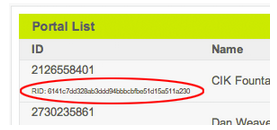
"portal_rid"- resource ID of portal where the device is to be created. User creating the device must have at least manager level access to this portal. This may be found in the output of the /portal/ API call, or in Portals here: https://.exosite.com/admin/portallist
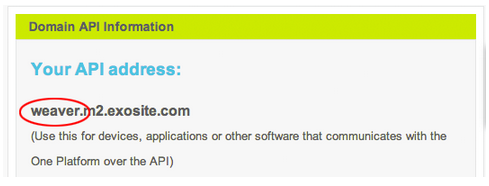
"vendor"- vendor identifier. Administrators may find this identifier here: https://.exosite.com/admin/home
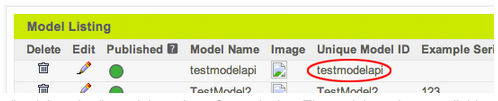
"model"- client model of device to create. Administrators may find this here, at the bottom of the page: https://.exosite.com/admin/managemodels
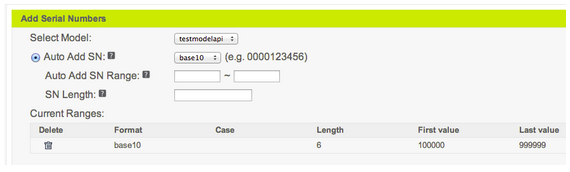
"serialnumber"- serial number of new device. The serial numbers available are configurable per device model. Administrators may configure individual serial numbers, or configure a range, here: https://.exosite.com/admin/serialnumbers For example, this model has serial numbers consisting of six base 10 digits, e.g. 123456.
"name"- device name. This is a human-readable name for the device."timezone"- device timezone (optional)"location"- device location (optional)
The domain name in the HTTP request indicates which domain to authenticate the user, and must be the same domain in which portal_rid is registered.
On success, response has a HTTP status code 200. The response body contains a JSON object with the following keys:
"rid"- resource identifier for created device"cik"- key for created device
After creating a device, it is necessary to activate it using the provisioning API. This is normally done by device firmware, but may also be done at the command line for testing.
[https://github.com/exosite/api/blob/master/provision/device.md#provisionactivate]
The RID and CIK may then be used with Exosite’s other APIs to interact with the device.
On failure, response has a HTTP status code of 400 or greater. The response body contains a JSON formatted response object. The response object may contain the following keys:
-
"errors"- array of error identifier strings-
"limit"- portal’s device limit has been reached -
"invalid_sn"- serial number is invalid -
"unavailable_sn"- serial number is not available -
"forbidden_model"- model is not available in this domain -
"require_purchase"- creating this type of device requires a purchase -
"insufficient_resources"- device could not be added due to insufficient resources in the portal -
"portal_not_found"- portal_rid could not be found -
"missing_*"- some required input was missing. E.g.missing_portal_ridindicates missing or empty (blank) portal_rid.
-
-
"notices"- array of user-readable error strings
Create the device:
$ curl https://joesdomain.exosite.com/api/portals/v1/device -d '{"model": "myDeviceModel", "vendor":"joevendor", "serialnumber":"ABC-123", "location":"Samoa", "timezone":"(GMT-11:00) Midway Island, Samoa", "portal_rid": "5ef46b987385aaaaaaaaaa75183fb43edeb3557b", "name":"Device Name"}' --user joe@gmail.com:joep4ssword
{
  "cik": "ef123475183fb435ef46b987385abcdedeb3557b",
  "rid": "987385abcdedeef123475183fb435ef46baf367b"
}
Then activate the device. Normally this would be done from the device firmware, but we do it here from the command line as an example.
$ curl https://m2.exosite.com/provision/activate -d 'vendor=joevendor&model=myDeviceModel&sn=ABC-123'
ef123475183fb435ef46b987385abcdedeb3557b
POST /api/portals/v1/portals/{portal-id}/devices
Create a device inside a portal
Request body is a device object. Currently only the following keys are supported:
"sn"- Serial number (required)"vendor"- Vendor name (required)"model"- Model name (required)"type"- Device type, must be 'vendor' for this moment (required)
If you send any keys besides these, it will do nothing.
On success, response has HTTP status 201 and the created device object.
On failure, response has HTTP status of 400 or greater.
TODO
GET /api/portals/v1/devices/{device-id}
Get information for a device.
Request body is empty.
On success, response has HTTP status 200 and a device object:
On failure, response has HTTP status of 400 or greater.
TODO
DELETE /api/portals/v1/groups/{group-id}
Delete a group
Request body is empty.
On success, response has HTTP status 204 and empty body.
On failure, response has HTTP status of 400 or greater.
TODO
PUT /api/portals/v1/devices/{device-id}
Update a device
Request body is a device object. Currently only the following keys may be updated:
"info": {"description": ...}- description under info (optional)"info": {"description": ...}- description under info (optional)
If you send any keys besides these, it will do nothing.
On success, response has HTTP status of 200 and body is the updated device object.
On failure, response has HTTP status of 400 or greater.
curl https://mydomain.exosite.com/api/portals/v1/users -d '{"email":"a_new_user@gmail.com"}' -H 'Content-Type: application/json' --user joe_subdomainadmin@gmail.com:joep4ssword
DELETE /api/portals/v1/devices/{device-id}
Delete a device
Request body is empty.
On success, response has HTTP status of 204 and body is empty.
On failure, response has HTTP status of 400 or greater.
curl https://mydomain.exosite.com/api/portals/v1/users -d '{"email":"a_new_user@gmail.com"}' -H 'Content-Type: application/json' --user joe_subdomainadmin@gmail.com:joep4ssword
POST /api/portals/v1/portals/{portal-id}/data-sources
Create a data source inside a portal
Request body is a data source object. Currently only the following keys are supported:
"format"- data source format (optional)"name"- data source name (optional)"unit"- data source unit (optional)
If you send any keys besides these, it will do nothing.
On success, response has HTTP status 201 and the created data source object.
On failure, response has HTTP status of 400 or greater.
TODO
GET /api/portals/v1/data-sources/{data-source-id}
Get information about a Portals data source.
Request body is empty.
On success, response has HTTP status 200 and a body containing a data source object.
On failure, response has HTTP status of 400 or greater.
TODO
GET /api/portals/v1/data-sources/{data-source-id}/data
This API can retrieve multiple data points. The options below can be included to modify the results of an API call:
-
"starttime"and"endtime"are Unix timestamps that specify the window of time to read. -
"sort"defines the order in which data points will be displayed. -
"limit"sets the a maximum on the number of data points to return.
For more details about these options, see the read API.
Request body is empty.
On success, response has HTTP status 200 and body is a list of data points. See the contents of "data" from a data source object for details.
On failure, response has HTTP status of 400 or greater.
api/portals/v1/data-sources/ResourceID/data?starttime=Unix Timestamp for starttime&endtime=Unix Timestamp for endtime&limit=Number of data points&sort=Sorting order of choice
api/portals/v1/data-sources/610487b9e01c67d4b3dc68574b839b08783c737b/data?starttime=1413517485&endtime=1413517487&limit=2&sort=desc
POST /api/portals/v1/data-sources/{data-source-id}/data
Write data
Request body is a value.
On success, response has HTTP status 201 and the body is empty.
On failure, response has HTTP status of 400 or greater.
TODO
GET /api/portals/v1/data-sources/{data-source-id}/json
This is identical to GET /api/portals/v1/data-sources/{data-source-id}/data
Request body is empty.
On success, response has HTTP status 200 and body is a list of data points. See the contents of "data" from a data source object for details.
On failure, response has HTTP status of 400 or greater.
$ curl 'https://testing.signoff.portalsapp/api/portals/v1/data-sources/902974faa4c14e36a6331cc991ff78a3b5121ff7/data
    -X GET
    -u 'testing@exosite.com:1234'
    -k -i
POST /api/portals/v1/data-sources/{data-source-id}/json
Write json data
- safe safe write, server will wait for 1s and scan the data again for safety
Request body is a valid JSON.
On success, response has HTTP status 201 and the body is empty.
On failure, response has HTTP status of 400 or greater.
When safe is passed in querystring, failure will response 409
curl 'https://testing.signoff.portalsapp/api/portals/v1/data-sources/902974faa4c14e36a6331cc991ff78a3b5121ff7/data
    -X POST
    -d '{"how":"are","you":"?"}'
    -u 'testing@exosite.com:1234'
    -k -i
POST /api/portals/v1/users/{user-id}/groups
Create a group under a user. A group under a user may be updated only by that user. (TODO: confirm this)
The request body is a group object. Currently, only the following keys are supported:
"name"- group name (optional)
If you send keys besides these, it will do nothing.
On success, response has HTTP status 201 and the created group object.
On failure, response has HTTP status of 400 or greater.
TODO
GET /api/portals/v1/groups/{group-id}
Get information about a group.
Request body is empty.
On success, response has HTTP status 200 and body is a group object.
On failure, response has HTTP status of 400 or greater.
TODO
PUT /api/portals/v1/groups/{group-id}
Update a group
Body contains a group object. Currently only the following keys may be updated:
"members"- group members (optional)"meta"- group meta (optional)"name"- group name (optional)"permissions"- group permissions (optional)
If you send any keys besides these, it will do nothing.
On success, response has HTTP status 200 and group object.
On failure, response has HTTP status of 400 or greater.
TODO
GET /api/portals/v1/domain/
Returns an array of domains to which the user’s account is added.
Request body is empty.
On success, response has HTTP status 200 and JSON array of domain objects. Domain objects contain the following keys:
-
"domain"- the domain address. This may be used in a subsequent call to /api/portals/v1/portal/ -
"role"- the user’s role on this domain. Has one of the following values:-
"user"- non-admin -
"admin"- domain admin
-
-
"name"- vendor name (for provisioning API) -
"token"- vendor token (for provisioning API)
On failure, response has HTTP status of 400 or greater.
$ curl https://portals.exosite.com/api/portals/v1/domain/ --user joe@gmail.com:joep4ssword
[
    {
        "role":"user",
        "name":"exosite_portals",
        "domain":"portals.exosite.com"
    },
    {
        "role":"admin",
        "domain":"joesdomain.exosite.com",
        "name":"joesdomain",
        "token":"01233fb43edeb3557b5ef46b987385abcdef0123"
    }
]
Themes are designs that are applied to your domain. Only a domain administrator user can use these Theme APIs. All theme APIs share the same prefix: /api/portals/v1/themes/. Note: Image data can currently not be modified using this API A sample theme object looks like this:
{
    "id": "3077881923",
    "name": "sample_theme",
    "description": "this is a description",
    ":default": true,
    "config": {
        "dashboard_background": {
            "background_color": "F9F9F9",
            "background_image": "",
            "background_attachment": "scroll",
            "background_repeat": "repeat-y",
            "background_position": "left top"
        },
        "header_logo": "https:\/\/portals.yourdomain.com\/cache\/theme\/0_1923506535_header_logo.png",
        "header_bkimage": "https:\/\/portals.yourdomain.com\/static\/png\/skin_portals_bannerbg.png?62d38477d5d7a46968a168c460bf76fc",
        "header_title_color": "D5E04D",
        "header_subtitle_color": "FFFFFF",
        "header_titles_position_top": "1.375em",
        "header_linktext_color": "E5E5E5",
        "header_linktextover_color": "D5E04D",
        "header_dropdown_text_color": "FFFFFF",
        "header_linktext_position_top": "1.5em",
        "header_portalmenu_current_color": "0000FF",
        "footer_text": "ANY DEVICE. ANY DATA. ANY WHERE.",
        "footer_text_color": "D5E04D",
        "footer_bar_color": "D5E04D",
        "footer_linktext_color": "5C5D60",
        "footer_linktextover_color": "000000",
        "block_title_text_color": "000000",
        "block_title_linkover_color": "010101",
        "block_title_back_color": "D5E04D",
        "block_invert_icons": "",
        "managepage_highlight_text_color": "0000FF",
        "dashboard_thumbnail": "",
        "thankyoupage_title_text_color": "D5E04D",
        "browser_tab_text": "Exosite Portals",
        "browser_tab_icon": "https:\/\/portals.yourdomain.com\/static\/png\/icon_exosite.png?834282e60aa5c2cf2d3a6894307437dd",
        "admin_menu_style": {
            "admin_menu_title": "Domain Admin",
            "manage_menu_title": "Manage",
            "secondary_menu_title": "Portal Menu",
            "account_menu_title": "Account",
            "menu_title_color": "E5E5E5",
            "background_color": "5C5D60",
            "background_hover_color": "A6A6A6",
            "text_color": "FFFFFF",
            "sub_background_color": "FFFFFF",
            "sub_background_hover_color": "A6A6A6",
            "sub_text_color": "5C5D60",
            "text_active_color": "D5E04D"
        },
        "jsCode": ""
    },
    "code": ""
}
GET /api/portals/v1/themes/
POST /api/portals/v1/themes/
The post body needs to be JSON encoded and at least include the required fields:
- name
- description
GET /api/portals/v1/themes/{themeid}
PUT /api/portals/v1/themes/{themeid}
The post body needs to be JSON encoded.
DELETE /api/portals/v1/themes/{themeid}
When deleting the current default theme the exosite system theme will be applied to the domain.
Client models represent a class of devices. All devices of the same client model have the same behaviour attributes and pricing. Only the domain administrator can use the client model APIs. Note: Image data can currently not be modified using this API A sample client model object looks like this:
{
    "id": "samplevendor\/samplemodel",
    "domainID": "0000000000",
    "vendor": "samplevendor",
    "friendly": "dfhg",
    "name": "samplemodel",
    "cloneRID": "29770f4f96122ffd33af1f6edb1b875810c7844a",
    "viewID": "0000000000",
    "exampleSN": "",
    "sharedSN": "",
    "convertSN": "no",
    "alternateSN": "",
    "noteSetup": "",
    "noteName": "",
    "noteLocation": "(optional - can be a string or GPS decimal degrees)",
    "pictureDevice": "https:\/\/portals.yourdomain.com\/cache\/model\/samplevendor\/samplemodel_PictureDevice.png",
    "description": "",
    "pictureSN": "",
    "confirmPage": "Your [client model name] [device] was successfully enabled with the CIK\u003Cbr\/\u003E[device cik]\u003Cbr\/\u003E\u003Cbr\/\u003EYour [device] will need to connect to the Exosite platform within 24 hours or your provision request will expire and you will need to re-enable your [device] from the Re-Enable block in your [device] pop-up. If you have any problems connecting, please contact your [device] provider at:\u003Cbr\/\u003E\u003Cbr\/\u003E\u003Cb\u003ECompany name:\u003C\/b\u003E [company name]\u003Cbr\/\u003E\u003Cb\u003ECompany email contact information:\u003C\/b\u003E [company email]\u003Cbr\/\u003E",
    "companyName": "",
    "contactEmail": "",
    ":published": true
}
Themes are designs that are applied to your domain. Only a domain administrator user can use these Theme APIs. All theme APIs share the same prefix: /api/portals/v1/themes/.
Note: Image data can not be modified using this API
A sample theme object looks like this:
{
    "id": "3077881923",
    "name": "sample_theme",
    "description": "this is a description",
    ":default": true,
    "config": {
        "dashboard_background": {
            "background_color": "F9F9F9",
            "background_image": "",
            "background_attachment": "scroll",
            "background_repeat": "repeat-y",
            "background_position": "left top"
        },
        "header_logo": "https:\/\/portals.yourdomain.com\/cache\/theme\/0_1923506535_header_logo.png",
        "header_bkimage": "https:\/\/portals.yourdomain.com\/static\/png\/skin_portals_bannerbg.png?62d38477d5d7a46968a168c460bf76fc",
        "header_title_color": "D5E04D",
        "header_subtitle_color": "FFFFFF",
        "header_titles_position_top": "1.375em",
        "header_linktext_color": "E5E5E5",
        "header_linktextover_color": "D5E04D",
        "header_dropdown_text_color": "FFFFFF",
        "header_linktext_position_top": "1.5em",
        "header_portalmenu_current_color": "0000FF",
        "footer_text": "ANY DEVICE. ANY DATA. ANY WHERE.",
        "footer_text_color": "D5E04D",
        "footer_bar_color": "D5E04D",
        "footer_linktext_color": "5C5D60",
        "footer_linktextover_color": "000000",
        "block_title_text_color": "000000",
        "block_title_linkover_color": "010101",
        "block_title_back_color": "D5E04D",
        "block_invert_icons": "",
        "managepage_highlight_text_color": "0000FF",
        "dashboard_thumbnail": "",
        "thankyoupage_title_text_color": "D5E04D",
        "browser_tab_text": "Exosite Portals",
        "browser_tab_icon": "https:\/\/portals.yourdomain.com\/static\/png\/icon_exosite.png?834282e60aa5c2cf2d3a6894307437dd",
        "admin_menu_style": {
            "admin_menu_title": "Domain Admin",
            "manage_menu_title": "Manage",
            "secondary_menu_title": "Portal Menu",
            "account_menu_title": "Account",
            "menu_title_color": "E5E5E5",
            "background_color": "5C5D60",
            "background_hover_color": "A6A6A6",
            "text_color": "FFFFFF",
            "sub_background_color": "FFFFFF",
            "sub_background_hover_color": "A6A6A6",
            "sub_text_color": "5C5D60",
            "text_active_color": "D5E04D"
        },
        "jsCode": ""
    },
    "code": ""
}
GET /api/portals/v1/themes/
GET /api/portals/v1/themes/{themeid}
POST /api/portals/v1/themes/
The post body needs to be JSON encoded and at least include the required fields:
- name
- description
PUT /api/portals/v1/themes/{themeid}
The post body needs to be JSON encoded.
DELETE /api/portals/v1/themes/{themeid}
When deleting the current default theme the exosite system theme will be applied to the domain.
GET /api/portals/v1/client-models/
POST /api/portals/v1/client-models/
The post body needs to be JSON encoded and at least include the required fields:
- friendly
- name
- cloneRID
GET /api/portals/v1/client-models/{vendor}/{name}
PUT /api/portals/v1/client-models/{vendor}/{name}
The post body needs to be JSON encoded.
DELETE /api/portals/v1/client-models/{vendor}/{name}
When deleting the current default client model the exosite system client model will be applied to the domain.
Require ___admin permission to the domain to access this end point.
<form action="/api/portals/v1/fs{directory-path}" enctype="multipart/form-data" method="POST">
    <div>
        <input name="{field-name-1}" type="file">
        <input name="{field-name-2}" type="text">
        <button type="submit">Submit</button>
    </div>
</form>
<directory-path>can be[\/\-_0-9A-Za-z]*.<field-name-*>is^[\-0-9_A-Za-z]*$.
Submission of this form redirects the page to "/api/portals/v1/fs{directory-path}/{subdirectory}".
The response entity body is:
{
    {field-name-1}: {field-content-type-1},
    {field-name-2}: {field-value-2}
}
{field-name-*}is the literal send in the request.{field-content-type-1}is the content type of the file as the value of field 1.{field-value-2}is the value of{field-name-2}.
Require no permission to access this end point.
Following Append to a directory.
GET /api/portals/v1/fs{directory-path}/{subdirectory}/{field-name-1}
Returns the content of the file as the value of field 1.
GET /api/portals/v1/fs{directory-path}/{subdirectory}/{field-name-2}
Returns the value of field 2 as a JSON string.
- Get multiple users
GET /users/_this/users/[{user-id},{user-id},...] - Get multiple groups
GET /users/_this/groups/[{group-id},{group-id},...] - Get multiple devices
GET /users/_this/devices/[{device-rid},device-rid},...] - Get multiple data sources
GET /users/_this/data-sources/[{data-source-rid},{data-source-rid},...]
- limit
Internal limit is 200 some are smaller. 0 <= x <= (INTERNAL LIMIT).
/users/_this/users/[{user-id},{user-id},...]?limit=10 - offset
numbers of items to skip.
/users/_this/users/[{user-id},{user-id},...]?offset=10
[
    {object1}, {object2}, ...
]
Please refer to their single endpoint. User, Groups, Devices, Data sources
- 200 if all items are fetched.
- 206 if request ID is over the response limit, link will appear in header.
Link=<{url}>; rel="previous", <{url}>; rel="next"
$ curl 'https://testing.signoff.portalsapp/api/portals/v1/users/_this/data-sources/[929df3b005cc908f9b742c239b043fc63c0c0be7,ece4343f05bc486c11dd1f28b25eca60501fafda,902974faa4c14e36a6331cc991ff78a3b5121ff7]'
    -X GET
    -u 'testing@exosite.com:1234'
    -k -i