JobLauneSathi is a full-stack MERN application designed to connect job seekers with employers. It provides a comprehensive platform for posting job listings, managing applications, and discovering career opportunities.
- Job Discovery: Search and filter jobs by keyword, location, category, job type, and salary range.
- Profile Management: Create and update your user profile, including your name and avatar.
- Resume Upload: Upload and manage your resume (PDF format) for easy application.
- Job Applications: Apply for jobs directly through the platform.
- Saved Jobs: Bookmark jobs to review and apply for later.
- Application Tracking: View the status of your submitted applications (e.g., Applied, In Review, Accepted).
- Job Management: Create, edit, and delete job postings with detailed descriptions and requirements.
- Applicant Tracking: View and manage all applications for a specific job. Update applicant statuses to streamline the hiring process.
- Company Profile: Manage your public-facing company profile, including a description and logo.
- Analytics Dashboard: Get an overview of hiring metrics, including total active jobs, applications received, and successful hires, with trend analysis.
-
Frontend:
- React
- Vite
- Tailwind CSS
- Framer Motion
- Axios
- React Router
- Lucide React (for icons)
- React Hot Toast (for notifications)
-
Backend:
- Node.js
- Express.js
- MongoDB
- Mongoose
- JSON Web Tokens (JWT) for authentication
- Bcrypt for password hashing
- Multer for file uploads
- CORS
The repository is organized as a monorepo with the following structure:
frontend/: Contains the React client-side application.backend/: Contains the Node.js and Express.js server-side API.bruno/: Includes a Bruno collection for easy API testing and documentation.
- Node.js (v20.19.0 or later)
- pnpm package manager
- MongoDB instance (local or remote)
-
Navigate to the
backenddirectory:cd backend -
Install dependencies:
pnpm install
-
Create a
.envfile from the example:cp .env.example .env
-
Populate the
.envfile with your credentials. To work seamlessly with the frontend, setPORTto8000.PORT=8000 MONGO_URI=your_mongodb_connection_string JWT_SECRET=your_jwt_secret_key
-
Run the development server:
pnpm run dev
The backend will be running on
http://localhost:8000.
-
Navigate to the
frontenddirectory:cd frontend -
Install dependencies:
pnpm install
-
Ensure the backend is running, as the frontend is configured to make API requests to
http://localhost:8000. -
Run the development server:
pnpm run dev
The application will be accessible at
http://localhost:5173(or another port if 5173 is in use).
The backend API provides endpoints for authentication, user profiles, job management, applications, and analytics.
The API endpoints are organized as follows:
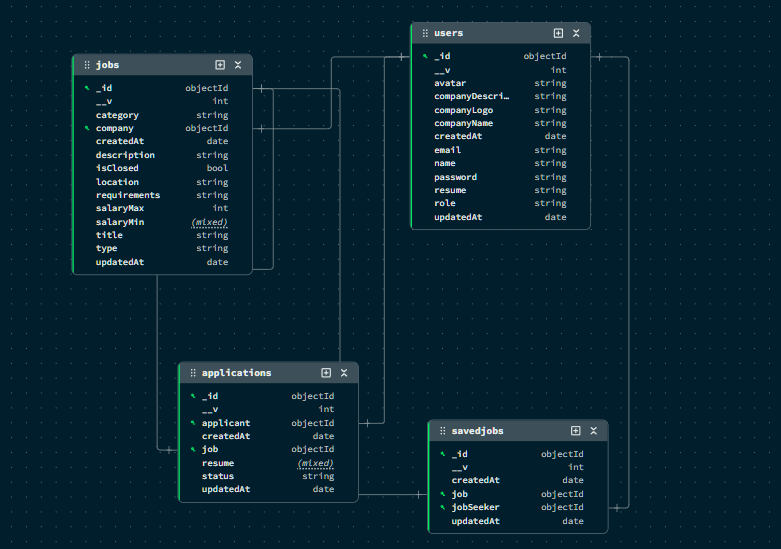
/api/auth: User registration, login, and profile updates./api/jobs: CRUD operations for jobs, searching, and filtering./api/applications: Job application submission and status management./api/save-jobs: Saving and unsaving jobs./api/user: Public user profiles./api/analytics: Analytics for the employer dashboard.
A complete Bruno collection is available in the bruno/ directory for testing all API endpoints. You can open the bruno/Job Posting API folder in Bruno to get started.
Also, there is openapi.json file in the burno folder which you can import.