
CoolSolve is a parser, structural analyzer, and equation solver using a language compatible with EES (Engineering Equation Solver), designed as an open-source alternative that integrates with CoolProp for thermodynamic property calculations.
Download the Windows installer: CoolSolve v0.4 for Windows
See Version History for all releases, changelogs, and the CoolProp version bundled in each release.
Try CoolSolve in your browser: https://coolsolve.squoilin.eu/ — and browse the model library at /library/.
⚠ Disclaimer: The online demo runs on a private server and corresponds to the latest development version, which may not always be stable. Under high load, the server may respond slowly or be temporarily unavailable.
-
Parser: Parses CoolSolve source code (
.eescodefiles) into an AST — variables, equations, procedural blocks (FUNCTION,PROCEDURE,CALL), control flow (IF-THEN-ELSE,DUPLICATE,REPEAT-UNTIL,GOTOwith numeric statement labels in routine bodies), directives (including the conditional compilation$IF/$IFNOT/$ELSE/$ENDIF,$CONSTANTand$INCLUDE), array subscripts and array ranges (X[1..n]as arguments, outputs and in routine headers), and named function arguments. -
Structural Analysis: Decomposes the equation system into solvable blocks using the Hopcroft–Karp matching algorithm and Tarjan's SCC algorithm.
-
Automatic Differentiation: Forward-mode AD with exact analytical derivatives for all arithmetic, transcendental, and CoolProp functions — no finite differences.
-
Configurable Solver Pipeline: Multiple algorithms with automatic fallback:
- Newton + Line Search (default workhorse)
- Trust-Region Dogleg with optional hybrd-style Broyden reuse
- Levenberg-Marquardt with geodesic acceleration
- Multi-dimensional Bisection (derivative-free, for singular Jacobians)
- Homotopy Continuation (for distant starting points)
- KINSOL (opt-in: Dennis-Schnabel line search, Picard, Anderson-accelerated fixed-point)
- Structural Tearing (equation tearing for large blocks)
- Symbolic Block Reduction (explicit extraction, CoolProp call inversion, equation substitution)
- Multi-Start fallback (CoolProp-consistent starting points for thermo blocks, scale factors for algebraic blocks; parallel execution available; engageable always, never, or only on Deep Search)
-
CoolProp Integration: Thermodynamic property calculations via the low-level
AbstractStateAPI (2–5× faster thanPropsSI), with analytical derivatives and thread-local caching. CoolProp mixtures are accepted as fluids ('R245fa[0.5]&R134a[0.5]', with a warning that mixture properties are predictive). The lithium bromide - water solution of the absorption machines is available through the EES ASHRAE routinesX_LIBR,H_LIBR,T_LIBRandP_LIBR(X_LIBR('SI', T, P), analytical derivatives; see Language Reference §5). The ammonia-water mixture is the EES fluidNH3H2O(any three of T, P, X, Q, H, S, U, V) and the procedureCALL NH3H2O(Code, In1, In2, In3 : T, P, x, h, s, u, v, q), on the IAPWS G4-01 formulation with exact derivatives (EES uses another model, so results agree within about 1 %; see Language Reference §5). -
Lookup Tables: 1D/2D interpolation, cell access, text cells (
LOOKUP$, the replacement of string arrays, which are not supported), the row of a key (LOOKUP$ROW), and aggregate functions from external CSV files, usable in equations, inFUNCTION/PROCEDUREbodies and inINTEGRALmodels. A GUI panel lets you create and edit tables in-browser. -
Equation-Based Dynamic Solving (
INTEGRAL): Solve initial-value DAE models in the EES integral form (y = y0 + INTEGRAL(dydt, t, t0, tf)). Supports coupled ODEs, algebraic variables, RK4/RK45/Euler integrators, Richardson extrapolation, and an Integral GUI tab. See Language Reference §12 and docs/integral_table.md.-
Solution Verification: Post-solve check that re-evaluates every equation (LHS ≈ RHS) to catch bugs the solver's convergence check may miss.
-
Try Harder: One-click recovery for failed solves. After a failed run the GUI's Solve button morphs into Try Harder; clicking it re-runs the model with the full Deep Search pipeline, tearing and symbolic reduction forced on, and the configured multi-start policy. Editing the model, the initials, or the configuration restores the normal Solve button.
-
-
Output Formats: JSON, LaTeX,
.solfiles, CSV trajectory files, and a comprehensive Debug Mode (-d) folder. -
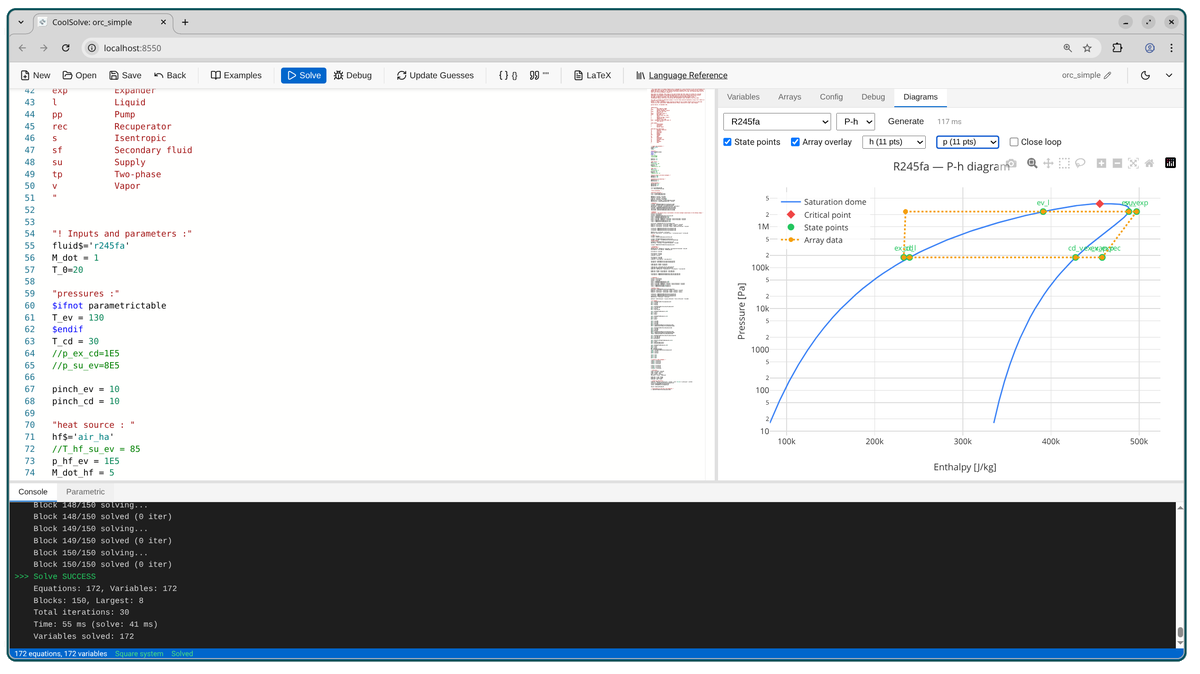
GUI & REST API: Embedded single-page app (React/TypeScript) with a code editor, variable table, parametric studies, thermodynamic diagrams, and ZIP bundle round-trip. See GUI & REST API.
-
Model Library: The GUI binary embeds the CoolSolve Library — documented, verified EES models (cycles, components, heat transfer, HVAC, …). The toolbar Library button follows the library taxonomy and opens a whole model folder (code, initial values, lookup tables, configuration) in one click; the dashboard at
/library/lists every model, blocked ones included, with an Open in CoolSolve link on each. The library is fetched at build time, always at its latest version. Any model imports the functions and procedures of a library model, or of another.eescodefile of its folder, with$INCLUDE <name>— in the CLI and the GUI alike (a file of the folder takes precedence over a library model of the same name; the Library menu copies the line, an include bar opens each included file in its own window, the ZIP bundle carries them; e.g.$INCLUDE hx_ees_functionfor the EESHXfunction). See Model Library Support and Language Reference §7. -
Usage Log: In GUI mode, every solve or Try Harder attempt appends one CSV line to a local log file (timestamp, model name and size, outcome, duration, client IP, version). Written after the solve completes — no impact on solving. Aggregated statistics are available on a hidden
/statsdashboard. See GUI & REST API.
| Document | Description |
|---|---|
| Language Reference | CoolSolve language syntax, built-in functions, and configuration keys |
| Dynamic Solving | Equation-based INTEGRAL / $IntegralTable — algorithms, architecture, and limitations |
| Debugging Models | Diagnosing and fixing solver failures |
| Importing EES Models | Reading binary EES files (equations, guesses, stored solution, tables, units) and importing/verifying them in CoolSolve |
| Model Library | The curated EES model collection, embedded in the GUI: toolbar Library button, dashboard at /library/ |
| Model Library Support | How CoolSolve embeds and serves the CoolSolve Library, the features it needs, and the register of EES gaps found while importing models |
| Solver Roadmap | Performance roadmap, algorithm details, and implementation status |
| Symbolic Block Reduction | Symbolic block reduction algorithm |
| Solid Phases (design study) | Proposal for ice, dry ice, PCM and brine freezing properties coherent with CoolProp (not implemented) |
| GUI & REST API | Web interface, REST API, and parametric studies |
| Deployment Guide | Deploying CoolSolve on Ubuntu with Apache |
| Contributing Guide | Workflow and integration checklist for new features and bug fixes |
| Version History | Release notes, download links, and CoolProp version per release |
For details on current performance optimizations and the future roadmap for solver integration, see the Solver Roadmap.
CoolSolve uses several file formats for input and verification:
- .eescode: The EES source code to be parsed and solved.
- .initials: Initial values for variables, used to seed the solver or evaluator. Format:
variable=value(one per line). - coolsolve.conf: Optional solver configuration, one
key = valueper line, placed in the same folder as the.eescodefile: only the keys it sets override the defaults. Every key, with its default and when to change it, is documented inexamples/coolsolve.conf; the GUI configuration editor edits the same keys. The groups of options:- Convergence: tolerances, iteration limits, line search, variable scaling, timeout.
- Solver pipeline: which solvers run and in what order (
solverPipeline; defaultNewton), sequential or parallel, the Try Harder (Deep Search) pipeline, multi-start, and the tuning of each solver. - Block pre-processing: structural tearing and symbolic block reduction (off by default).
- CoolProp: backend, AbstractState API, analytical derivatives, caching, superancillaries.
- Dynamic models (
INTEGRAL): integrator, step size, error control,$IntegralTableoutput interval. - LaTeX report: generation and compiler.
- C++17 compatible compiler (GCC 7+, Clang 5+, or MSVC 2019+)
- CMake 3.14 or later
- Git (for fetching dependencies, including the model library of GUI builds)
- Python 3 (required by CoolProp's CMake scripts at configure time)
- Node.js 18+ and npm (required to build the React GUI frontend)
On Ubuntu/Debian, install all prerequisites at once:
sudo apt update && sudo apt install -y build-essential cmake git python3 nodejs npmCoolSolve is a standalone library that automatically downloads all its dependencies using CMake's FetchContent mechanism:
| Dependency | Purpose |
|---|---|
| CoolProp | Thermodynamic property calculations |
| cpp-peglib | PEG parser generator |
| nlohmann/json | JSON serialization |
| Eigen | Linear algebra |
| Catch2 | Unit testing |
| CoolSolve Library | Model collection embedded in the GUI binary (COOLSOLVE_EMBED_LIBRARY, GUI builds only) |
The CoolSolve Library is fetched like CoolProp but follows its main branch: every cmake configure pulls the latest pushed version, and every cmake --build re-embeds whatever is on disk, so a GUI binary always carries the current library (coolsolve --version prints its commit). To embed a local checkout instead (uncommitted changes included), or to build without it:
cmake -DFETCHCONTENT_SOURCE_DIR_COOLSOLVELIBRARY=/path/to/CoolSolve_Library ..
cmake -DCOOLSOLVE_EMBED_LIBRARY=OFF ..                  # no library in the binary
cmake -DFETCHCONTENT_FULLY_DISCONNECTED=ON ..           # offline: use what is already fetched
Dependencies are cached in .fetchcontent_cache/ at the project root. This cache persists across build folder deletions, so you won't need to re-download dependencies if you clean and rebuild. The first cmake run will take several minutes to fetch CoolProp (full history, as the pinned commit is not a branch tip) and its submodules; subsequent runs take only a few seconds.
mkdir build && cd build
cmake ..
make -j$(nproc)
This will build:
coolsolve- The main executablecoolsolve_tests- The test suite
- Visual Studio 2022 with the "Desktop development with C++" workload (includes MSVC, CMake, and Windows SDK)
- Python 3 (or Anaconda) — required by CoolProp's CMake scripts; must be on
PATH - Node.js (v18+) — required to build the embedded React GUI
- NSIS — to generate the single-file installer (optional, installer only)
The React frontend must be built before CMake can embed it into the binary:
cd gui
npm ci
npm run build
cd ..
This produces gui/dist/ which CMake will embed into the .exe.
mkdir build
cd build
cmake .. -G "Visual Studio 17 2022" -A x64 -DCOOLSOLVE_BUILD_GUI=ON -DCOOLSOLVE_BUILD_TESTS=OFF
cmake --build . --config Release --target coolsolve
The compiled binary is at build\Release\coolsolve.exe and is fully self-contained (no external runtime or DLLs needed).
After a successful build:
makensis coolsolve.nsiThis produces CoolSolve_Installer.exe, a single-file installer that:
- Installs to
Program Files\CoolSolve - Adds a Start Menu shortcut
- Associates
.eescodefiles with CoolSolve (double-click to open) - Includes an uninstaller
A convenience script build_installer.bat in the project root automates all steps above. Edit the paths at the top of the file if your Visual Studio, Anaconda, or NSIS installations are in non-default locations, then right-click → Run as Administrator.
Important: CoolSolve defaults to Release mode for optimal performance. CoolProp property calculations are computationally intensive, and Debug mode can be 10-50x slower than Release. Do not switch to Debug for routine work, benchmarks, or robustness reports — only when you genuinely need a debugger on the C++ code. When you are done debugging, always switch back to Release and rebuild:
cmake -DCMAKE_BUILD_TYPE=Release ..
cmake --build . -j$(nproc)    # or: make -j$(nproc)
# Default: Release mode (recommended)
cmake ..
# Explicitly set Release mode
cmake -DCMAKE_BUILD_TYPE=Release ..
# Debug mode (C++ debugger only — revert to Release afterwards!)
cmake -DCMAKE_BUILD_TYPE=Debug ..If you experience slow solve times, verify you're building in Release mode:
# Check current build type (must show Release)
grep CMAKE_BUILD_TYPE CMakeCache.txtCoolSolve is built with one pinned CoolProp commit, recorded in CMakeLists.txt
(COOLSOLVE_COOLPROP_PINNED_TAG): a CoolSolve commit therefore determines the property
library its results come from. coolsolve --version prints the CoolProp version and git
revision actually linked. To build with another CoolProp (tag, branch or commit):
cmake -DCOOLSOLVE_COOLPROP_TAG=v6.6.0 ..      # a tag
cmake -DCOOLSOLVE_COOLPROP_TAG=abc123def ..   # or a commit hash
An existing build directory keeps the value it cached: when it differs from the pin,
cmake prints a warning with the command that aligns it
(cmake -DCOOLSOLVE_COOLPROP_TAG=<pin> ..). Bumping the pin is a deliberate change, see
Contributing.
# Clean build artifacts only (keeps dependency cache)
rm -rf build && mkdir build && cd build && cmake .. && make -j$(nproc)

# Full clean including dependency cache (will re-download everything)
rm -rf build .fetchcontent_cache# Parse a .eescode file and output JSON analysis
./coolsolve input.eescode
# Output LaTeX equations
./coolsolve -f latex input.eescode
# Save output to a file
./coolsolve -o output.json input.eescodeDebug mode creates a folder containing all analysis information, useful for understanding the equation structure and debugging. For a complete guide on diagnosing and fixing solver failures (including the simplified-model workflow), see Debugging Models.
# Create debug output in <input>_coolsolve/ folder
./coolsolve -d input.eescode

# Specify custom debug output directory
./coolsolve -d my_debug_folder input.eescode
The debug folder contains:
| File | Description |
|---|---|
README.md |
Index of all generated files |
coolsolve.conf |
Copy of solver config from source folder (if present) |
report.md |
Model statistics, block summary, the branch kept by each $IF/$IFNOT directive and the files read by $INCLUDE |
variables.md |
Variable mapping table (Markdown) |
variables.csv |
Variable mapping (CSV for external tools) |
equations.md |
Equations grouped by solution block |
analysis.json |
Full JSON analysis data |
residuals.txt |
CoolSolve residuals report |
equations.tex |
LaTeX formatted equations |
incidence.md |
Variable-equation incidence matrix |
evaluator.md |
Evaluator structure and block evaluation tests |
symbolic_reduction.md |
Symbolic reduction debug report (when enableSymbolicReduction is on) |
integral.md |
Integral solver report (dynamic/INTEGRAL models) |
integral_table.csv |
Full trajectory CSV (dynamic/INTEGRAL models) |
solution_check.md |
Post-solve equation verification (LHS vs RHS for every equation) |
solver_singular_diagnostics.md |
Residuals and Jacobian of the first block that failed with a singular Jacobian, with its non-finite entries and zero rows/columns |
original.eescode |
Copy of the original input |
| Option | Description |
|---|---|
-o, --output <file> |
Output file (default: stdout) |
-f, --format <fmt> |
Output format: json, latex (default: json) |
-d, --debug [dir] |
Create debug output folder |
-g, --guess |
Update .initials file with solution on success |
--no-sol |
Do not write the .sol file (an existing one is left untouched) |
--no-superancillary |
Disable CoolProp superancillary functions |
--version |
Print the CoolSolve version, the CoolProp version and git revision, and (GUI builds) the embedded model library commit |
-h, --help |
Show help message |
CoolProp's superancillary functions are used for the vapor-liquid equilibrium (VLE) of pure fluids (default: enabled). They can be switched off, for example to compare results.
# Default: superancillaries enabled
./coolsolve model.eescode

# superancillaries disabled
./coolsolve --no-superancillary model.eescode

# Alternative: use environment variable
COOLPROP_ENABLE_SUPERANCILLARIES=false ./coolsolve model.eescodecd build
# Run all unit tests (parser, evaluator, Newton, tearing, config, etc.)
./coolsolve_tests
# Run comprehensive example file tests (solves every .eescode example,
# checks expected values, and runs solution verification on each)
./coolsolve_tests "[examples-comprehensive]"
# Library regression: every runnable CoolSolve Library model against its .sol baseline
# (the checkout embedded in the build, or COOLSOLVE_LIBRARY_DIR=<checkout>; targets selected with
# COOLSOLVE_LIBRARY_TEST_FILTER / COOLSOLVE_LIBRARY_TEST_EXCLUDE, e.g. CSL-0001,CSL-0009:coolsolve)
./coolsolve_tests "[library-regression]"
# Library tests: the model index/loader (unit tests) and, against the running GUI
# server, the Library menu, opening a model folder, per-tab sessions and /library/ pages
./coolsolve_tests "[library]"
python3 ../tests/test_library_api.py --auto
# GUI keyboard shortcuts (F2 = Solve) in headless Chromium, against the GUI server
# (needs Chromium/Chrome and the Python package websockets; skipped without them)
python3 ../tests/test_gui_shortcuts.py --auto
# Run solver robustness tests (stress-tests every example with multiple
# solver configurations: Newton-only, LM-only, tearing, symbolic reduction, etc.)
# Requires a Release build — Debug timings are ~10x slower and must not be committed as reports.
./coolsolve_tests "[solver-robustness]"Or using CTest:
cd build
ctest --output-on-failure
The examples/ folder is used by the CLI and the regression tests only — the GUI offers the model library instead.
The comprehensive test runs all .eescode files in the examples/ folder, validates solutions against known expected values (with 1% tolerance), and performs solution verification — independently re-evaluating every equation to confirm LHS ≈ RHS. A detailed report is written to examples/test_examples.md.
The library regression solves the main file of each verified or modified library model and every variant with a .sol baseline, with the CLI's pipeline, and requires each baseline variable within 1e-9 + 1e-6·max(|new|, |baseline|) (the rule of the library's tools/test_models.py). It writes library_regression.md in the build folder (PASS, DEVIATION with the worst variable, FAIL with the solver message) and is hidden: ./coolsolve_tests and ctest run only its self-tests. See Contributing §2.4.
The robustness test runs every solvable example under multiple solver configurations and reports a summary table of successes, failures, and iteration counts per configuration. A detailed report is written to examples/solver_robustness_report.md.
The CoolSolve GUI is a React/TypeScript single-page app served by an embedded HTTP server inside the coolsolve binary. The GUI is optional; the CLI continues to work as described above.
- Node.js + npm: Required only to build or develop the frontend (no Node.js is needed at runtime once the binary is built).
Use this when working on the GUI itself:
# Terminal 1: build and run the backend with the embedded HTTP server
mkdir -p build
cd build
cmake -DCOOLSOLVE_BUILD_GUI=ON ..
make -j$(nproc) coolsolve
./coolsolve --gui --no-browser

# Terminal 2: run the frontend dev server with hot reload
cd gui
npm install
npm run dev
# Then open http://localhost:5173 in your browser
In this mode, Vite serves the frontend on port 5173 and proxies API calls to the CoolSolve server (default port 8550).
To use the GUI as an integrated part of the coolsolve binary (no Node.js or Vite needed at runtime):
# 1) Build the frontend once
cd gui
npm install
npm run build        # produces gui/dist/

# 2) Build or rebuild the backend so it embeds gui/dist/ into the binary
cd ../build
cmake -DCOOLSOLVE_BUILD_GUI=ON ..
make -j$(nproc) coolsolve

# 3) Run the GUI
./coolsolve --gui     # opens the default browser, serving on http://localhost:8550
For more detailed information on the GUI architecture and advanced workflows (ZIP bundles, online deployment, thermodynamic diagrams, etc.), see docs/gui.md.
CoolSolve/
├── CMakeLists.txt              # Build configuration (handles all dependencies)
├── README.md                   # This file
├── main.cpp                    # CLI entry point
├── .fetchcontent_cache/        # Cached dependencies (auto-generated, git-ignored)
├── include/coolsolve/
│   ├── ast.h                   # Abstract Syntax Tree definitions
│   ├── parser.h                # Parser interface
│   ├── ir.h                    # Intermediate Representation
│   ├── structural_analysis.h   # Analysis algorithms
│   ├── symbolic_reduction.h    # Symbolic block reduction analysis
│   ├── autodiff_node.h         # Forward-mode AD types and operations
│   ├── evaluator.h             # Block and system evaluators
│   ├── libr_ashrae.h           # LiBr-H2O solution properties (EES routines X_LIBR, H_LIBR, T_LIBR, P_LIBR)
│   ├── ideal_gas.h             # Ideal gases (N2, CO2, H2O, ...): ideal-gas part of the CoolProp equation of state, exact derivatives
│   ├── nh3h2o.h                # Ammonia-water: IAPWS G4-01 formulation, saturation, 15 flashes (fluid and CALL NH3H2O)
│   ├── psychprops.h            # The nine outputs of CALL psychprops (EES PSYCHPROPS), shared by parser and evaluator
│   ├── taylor_jet.h            # Truncated Taylor arithmetic in 3 variables (exact derivatives of the Helmholtz energy)
│   ├── solution_checker.h      # Post-solve solution verification
│   ├── usage_log.h             # GUI solve-attempt log (append + aggregated stats)
│   ├── library_store.h         # Model library index: menu of verified models, model-folder loader
│   ├── include_resolver.h      # `$INCLUDE <name>`: a file of the model folder, else a library model
│   ├── version.h               # CoolSolve / CoolProp version info (`--version`)
│   └── solver.h                # Solver pipeline, all SolverOptions declarations
├── include/coolsolve/integral/
│   └── *.h                     # Equation-based dynamic solver (IntegralProblem, IntegralTable, Integrator, IntegralSolver)
├── src/
│   ├── parser.cpp              # CoolSolve language parser
│   ├── ir.cpp                  # IR building and LaTeX generation
│   ├── structural_analysis.cpp # Matching and SCC algorithms
│   ├── autodiff_node.cpp       # AD function implementations
│   ├── evaluator.cpp           # Evaluator implementations
│   ├── libr_ashrae.cpp         # ASHRAE LiBr-H2O correlations and their analytical derivatives
│   ├── ideal_gas.cpp           # Ideal gases from alpha0 of CoolProp: state from any two inputs, implicit-function derivatives
│   ├── nh3h2o.cpp              # Ammonia-water Helmholtz formulation (IAPWS G4-01)
│   ├── nh3h2o_flash.cpp        # Ammonia-water saturation solver and the three-property flashes
│   ├── evaluator_nh3h2o.cpp    # NH3H2O in the evaluator: fluid functions, CALL NH3H2O, units, derivatives
│   ├── integral/               # Equation-based dynamic solver (INTEGRAL / $IntegralTable)
│   │   ├── integrator_euler_explicit.cpp  # Forward Euler (fixed step)
│   │   ├── integrator_euler_implicit.cpp  # Backward Euler, A-stable (fixed step)
│   │   ├── integrator_rk4.cpp             # Classic RK4 (fixed step, default)
│   │   ├── integrator_rk45.cpp            # Dormand-Prince RK45 (adaptive)
│   │   ├── richardson.cpp                 # Richardson extrapolation wrapper
│   │   ├── integral_table.cpp             # Trajectory storage + interpolation + CSV
│   │   ├── integral_extraction.cpp        # IR → IntegralProblem classification
│   │   └── integral_solver.cpp            # Time-march loop, reuses algebraic Solver
│   ├── solver.cpp              # Pipeline orchestrator, Newton, tearing, config loading
│   ├── solver_bisection_nd.cpp # Multi-dimensional bisection solver
│   ├── solver_homotopy.cpp     # Homotopy continuation solver
│   ├── solver_lm.cpp           # Levenberg-Marquardt solver
│   ├── solver_kinsol.cpp       # KINSOL (SUNDIALS-style) solver: line search / Picard / Anderson
│   ├── solver_newton.cpp       # Newton + line search solver
│   ├── solver_symbolic.cpp     # Symbolic block reduction preprocessing
│   ├── solver_trust_region.cpp # Trust-region dogleg solver
│   ├── usage_log.cpp           # GUI solve-attempt log: CSV append + cached statistics
│   ├── library_store.cpp       # Model library index and loader (independent of HTTP), embedded snapshot accessor
│   ├── include_resolver.cpp    # Resolution of `$INCLUDE` names (project folder, library) for the CLI and the GUI
│   ├── version.cpp             # CoolSolve and CoolProp (version, git revision) at run time
│   └── solution_checker.cpp    # Post-solve equation-by-equation verification
├── tests/
│   ├── test_parser.cpp         # Parser/IR unit tests (Catch2)
│   ├── test_evaluator.cpp      # AD/Evaluator unit tests (Catch2)
│   ├── test_newton.cpp         # Newton solver unit tests
│   ├── test_solver_pipeline.cpp # Pipeline, LM, config tests
│   ├── test_solver_integration.cpp # Full-system solver integration tests
│   ├── test_new_solvers.cpp    # BisectionND, Homotopy, advantage tests
│   ├── test_solver_robustness.cpp  # Robustness tests (stiff/near-singular blocks)
│   ├── test_symbolic_reduction.cpp # Symbolic block reduction tests
│   ├── test_tearing.cpp        # Structural tearing unit tests
│   ├── test_config.cpp         # coolsolve.conf loading tests
│   ├── test_fluids.cpp         # CoolProp fluid property tests
│   ├── test_examples.cpp       # Integration tests with example files
│   ├── test_library_store.cpp  # Model library index/loader unit tests
│   ├── test_library_regression.cpp # Library regression: every runnable library model vs its .sol (slow, hidden) + self-tests
│   ├── test_includes.cpp       # `$INCLUDE`: resolution, imported routines, precedence, errors
│   ├── test_library_api.py     # Library menu, open, per-tab sessions, /library/, `$INCLUDE` (REST, needs the GUI build)
│   ├── test_gui_shortcuts.py   # GUI keyboard shortcuts (F2) in headless Chromium (needs the GUI build)
│   ├── test_ees_tools.py       # EES import tools (ees_extract.py, compare_solution.py) on synthetic files (plain Python, no build)
│   └── test_kinsol.cpp         # KINSOL solver unit tests (3 modes + config)
├── cmake/                      # embed_assets / embed_library: GUI, docs and model library embedded in the binary
├── tools/                      # EES import helpers: ees_extract.py, compare_solution.py (see docs/ees_import.md);
│                               # update_coolsolve.sh: server update, run as root (see docs/deployment_ubuntu_apache.md)
└── examples/                   # Example .eescode files for the CLI and the regression tests
CoolSolve follows a standard equation-solving pipeline:
-
Parsing — Source code (
.eescode) is parsed into an AST and then transformed into an Intermediate Representation (IR) that builds the variable-equation incidence matrix. -
Structural Analysis — The Hopcroft–Karp algorithm matches equations to output variables, Tarjan's algorithm finds strongly connected components (SCCs), and blocks are topologically sorted.
-
Automatic Differentiation — Forward-mode AD computes exact derivatives alongside values, building the Jacobian matrix analytically.
-
Evaluation — The evaluator computes residuals F(x) and Jacobian J for each block.
-
Solving — Each block is solved by the configurable pipeline (
Newton → TrustRegion → LM → BisectionND → Homotopy → Partitioned), with optional tearing and symbolic reduction. For detailed algorithm descriptions, see the Solver Roadmap. -
Dynamic Solving — When the model contains
INTEGRAL(...)calls, CoolSolve time-marches the state variables and re-solves the algebraic subsystem at each step. See Dynamic Solving.
For implementation details, see the Language Reference and Contributing Guide.
T_in = 25            // Temperature in Celsius
P = 101325           // Pressure in Pa
h = enthalpy('Water', T=T_in, P=P)
s = entropy('Water', T=T_in, P=P)
CoolSolve parses these 4 equations, identifies the variable-equation structure, and evaluates the thermodynamic properties using CoolProp. Temperatures are written in °C in the model — CoolSolve's unit system is fixed (it cannot be changed through coolsolve.conf) and the conversion °C → K required by CoolProp's SI interface is performed automatically behind the scenes.
For the full language syntax, built-in functions, and CoolProp integration details, see the Language Reference.
The CoolSolve Library is embedded, browsable and importable ($INCLUDE <name>); next steps are a command-line access (coolsolve --library), an Export for EES that writes the included routines into one file, editor completion of library functions, and improved plotting capabilities — see Model Library Support.
Planned improvements for the solver include a stiff ODE integrator (BDF), pseudo-arclength continuation, and an improved plotting interface. See docs/solver_roadmap.md for the full prioritized roadmap.
Planned property models for the absorption machines: a more recent LiBr-H2O correlation (the EES LiBrH2O library, Pátek & Klomfar 2006; register item CS-GAP-LIBR-PK) next to the ASHRAE routines, and the transport properties of ammonia-water (conductivity, viscosity, surface tension; CS-GAP-NH3H2O remainder) — see Model Library Support.
CoolSolve is released under the MIT License.
Main contributor: Sylvain Quoilin — ISES Research Group, Université de Liège.
This work is part of the broader development of CoolProp, an open-source thermophysical property library.