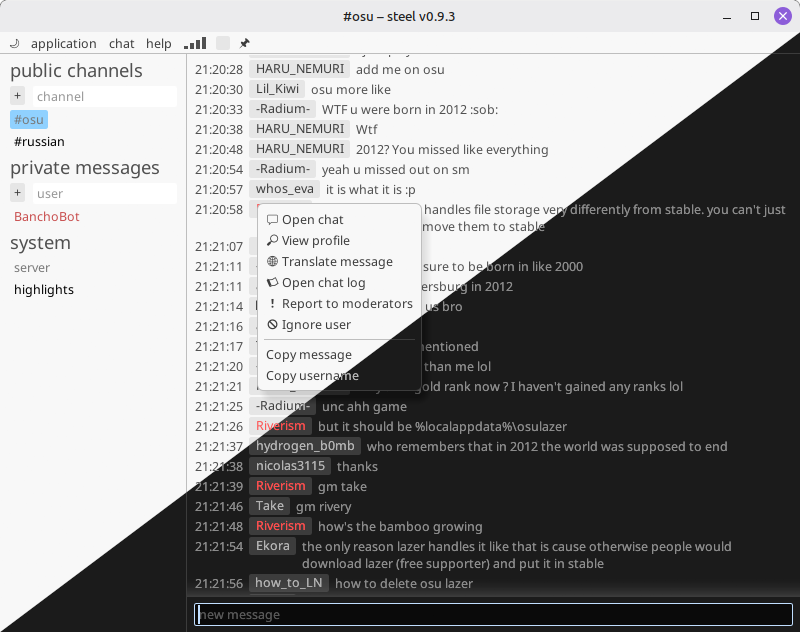
steel is a text chat client tailored to osu!, which provides the following features below the bare minimum ("send and receive messages"):
- custom, trackable chat highlights
- favourite channel list
- a Google Translate shortcut on chat messages
- a slightly customizable UI palette
download the latest version and extract it into a separate folder if you're running Windows/Linux. enable automatic updates for better experience.
on macOS the app is not signed by Apple, so macOS will block the first launch:
- open
System Settings>Privacy & Securityand clickOpen Anyway - alternatively, run
xattr -dr com.apple.quarantine /Applications/steel.appin the terminal.
see DEVELOPMENT.md if you want to build it from source.
should work out of the box, provided you have OpenGL installed.
(you probably have all of this already)
libasound.so.2
libssl.so.3
libcrypto.so.3
libgcc_s.so.1
libm.so.6
libc.so.6 # v2.39+
yes, with Windows/Linux/macOS support.
one of the heuristics is probably overly cautious, since it can't verify who built the executable. whitelist the application, and both of you should be fine (see example for Windows Defender -- also note the !ml suffix, which means "machine learning").
https://github.com/TicClick/steel/issues is the place.
you have two options:
- IRC: no. it's stored locally and only sent to the chat server -- see the source code.
- however, since the IRC server doesn't support SSL, the password is sent in CLEAR TEXT -- if someone is spying on the network, they will be able to eavesdrop and take it.
- on the other hand, if someone is spying on you, an exposed osu! chat password is one of the least concerns..
- however, since the IRC server doesn't support SSL, the password is sent in CLEAR TEXT -- if someone is spying on the network, they will be able to eavesdrop and take it.
- Websocket API: no. instead of passwords, the osu! API accepts temporary tokens with capabilities such as "send messages as user X", provided the user X authorized the app to do so
- there is a grey area, because by default I proxy the tokens through my server to get them to you for convenience (since I don't want you to know the analog of my app's "password"), but again, these are temporary and can be revoked.
- if you are extra paranoid, you can register your own API app and use its ID in my client -- that is well supported.
- there is a grey area, because by default I proxy the tokens through my server to get them to you for convenience (since I don't want you to know the analog of my app's "password"), but again, these are temporary and can be revoked.